Is this the ultimate language learning device?
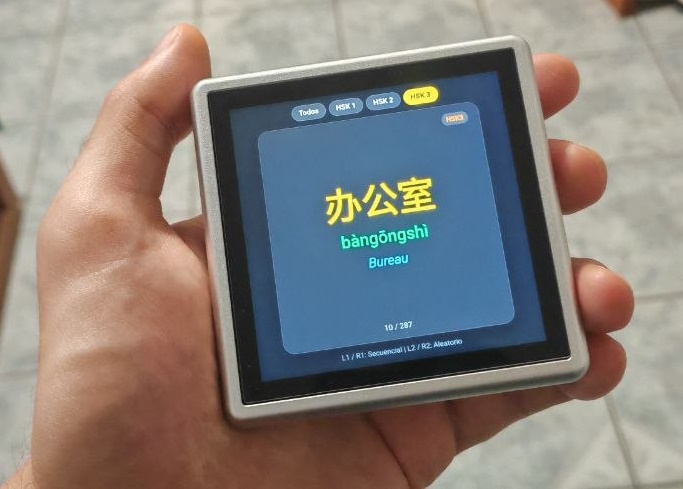
When you think of retro handheld consoles like the Anbernic RG Rotate, the first thing that comes to mind is retro gaming. With its crisp 1:1 square display and ergonomic shoulder triggers, it is an absolute dream for classic gaming.
But what if you used that exact same hardware to master Chinese vocabulary?
I recently turned this handheld console into a full-fledged, offline HSK flashcard reader—and the experience might just beat traditional smartphone apps.
The Problem with Learning Apps on Smartphones
Smartphone apps like Anki or Pleco are fantastic, but they come with a major downside: distractions. The second you unlock your phone to review 10 vocabulary words, a push notification pops up, Instagram calls your name, or a text message interrupts your focus.
Moreover, touch interfaces lack tactile satisfaction. Swiping through hundreds of cards on a glass screen quickly feels repetitive and draining.
Enter the RG Rotate: Tactile, Offline, and Focused
By leveraging the RG Rotate's built-in browser capabilities and Gamepad API support, I built a lightweight, single-file web application designed specifically for its unique form factor.
Here is why this setup works remarkably well:
- Physical Triggers for Active Recall: Instead of tapping a screen, you navigate cards using L1 and R1 for sequential review.
- Randomized Jumps on Demand: Pressing L2 or R2 immediately pulls a random word from your current level, keeping your brain engaged and preventing pattern memorization.
- 1:1 Square Aspect Ratio: The 720x720 display naturally frames Chinese characters (Hanzi), Pinyin, and translations without wasted space.
- Zero Distractions: No notifications, no social media feeds, and no constant pinging. Just you, the hardware, and the language.
- Easy on the hand: The RG Rotate is very pocketable and holding it feels very natural.
How It Works Under the Hood
The application relies on plain HTML5, CSS, and Vanilla JavaScript—meaning zero heavy frameworks and instant loading times.
To bridge the console controls with the app, it continuously polls the Gamepad API to capture shoulder button inputs:
// Mapping the physical shoulder buttons for flashcard navigation
const l1Pressed = gp.buttons[4] && gp.buttons[4].pressed; // Previous word
const r1Pressed = gp.buttons[5] && gp.buttons[5].pressed; // Next word

// L2 / R2 triggers for jumping to a random word within the active HSK level
const l2Pressed = gp.buttons[6] && (gp.buttons[6].pressed || gp.buttons[6].value > 0.5);
const r2Pressed = gp.buttons[7] && (gp.buttons[7].pressed || gp.buttons[7].value > 0.5);
It supports instant filtering across HSK 1, HSK 2, and HSK 3 vocabulary levels, allowing you to narrow your focus or shuffle through specific tiers whenever you want.
The Verdict
Is it really the ultimate language learning device? If you value tactile feedback, portability, and distraction-free study sessions, it just might be.
Turning dedicated gaming hardware into a productivity tool gives a second life to devices you already carry around. The next time you pick up your handheld, you can level up your real-world vocabulary before diving into your favorite game.
You can try it by navigating to https://raulbojalil.com/tools/zh.html